PTO tracker
PTO tracker with accrual built in
This PTO tracker works out accrual for you, per pay period or per hour worked, with caps and carryover, so balances are right without a spreadsheet. Employees request time through a link and see the hours before they send. US teams get state sick-leave presets, and payroll gets a CSV of leave hours for each pay period.
Free for up to 3 people, with a 14-day Pro trial. No card. State sick-leave rules and FMLA deadlines for US teams built in.
Built for your kind of team
Features
PTO that accrues, requests and reports itself
The six things a PTO tracker has to get right for a US team, in one place.
Accrual built in
PTO builds up per pay period, per hour worked or as a yearly grant, with caps and carryover. Set the rate once and balances stay current without anyone recalculating in a spreadsheet.
Balances in hours
Track PTO in hours or days, and see the hours a request will use before it is sent. Import your current spreadsheet as a CSV and set opening balances so the first day matches.
State sick-leave presets
Start from a preset that follows your state's paid sick leave law, with a link to the official source. Edit any preset to match your handbook.
Payroll export
Pick a pay period and download a CSV of leave hours by person and leave type, ready for your payroll run. Ready-made files for ADP Workforce Now, Gusto, Paychex Flex, QuickBooks Online Payroll and Paylocity are included too: you download one and upload it to your payroll service. It is not a live connection.
PTO requests by link
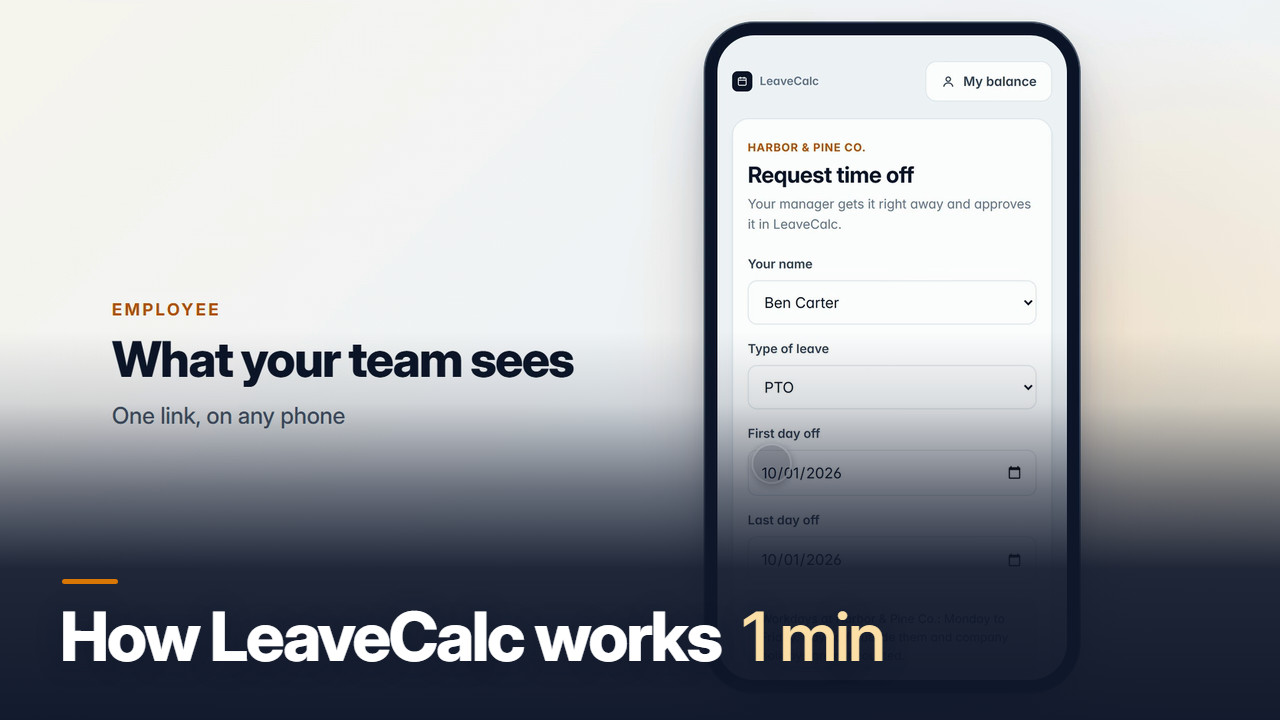
Share one link. Employees pick their name, leave type and dates and send. No accounts, no app to install, and you approve or deny in one click.
PTO calendar
See who is off by month or week, filtered by department, with a flag when two people from one team are out. Public holidays go in with one click.
PTO tracking software
PTO tracking software that knows the US rules
A US team has more to track than vacation days: state sick leave laws, cities with higher minimums and, for larger employers, FMLA. LeaveCalc keeps PTO and sick leave as separate balances with their own accrual rules, and FMLA cases alongside them.
Working out one person's accrual first? Use the free PTO accrual calculator or the PTO payout calculator. Both run in your browser.
PTO management
PTO management without the spreadsheet
Spreadsheets break when the accrual rate changes, when someone edits the wrong cell or when nobody can find the latest copy. PTO management in LeaveCalc keeps one policy, one balance history per person and one request link.
How it works
Set the accrual once, then balances keep themselves
Most teams are done the first afternoon.
Type or import a CSV, then set opening PTO hours.
A CSV file is dropped onto the People page. Twelve people appear with their opening balances and a message confirms 12 people imported.
A policy is built by choosing a state, which applies the rule of 1 hour per 30 hours worked. One click adds 11 public holidays to the calendar.
An employee fills in the public request form on a phone and sends it. The request reaches the manager with the hours and balance worked out. The manager approves it and the PTO balance drops from 46.2 to 6.2 hours.
Local rules for your country
Local rules, built in
Pick your country to see the statutory minimums and public holidays LeaveCalc sets up for your team.
80 countries, 39 rule sets, plus state sick-leave rules and FMLA deadlines for US teams.
Rules on file as of September 2026.
Also see
Pricing
Priced by team size, not by feature
Every plan has every feature except SAML single sign-on, which is for Business and Enterprise. You pay only when your team grows.
Free
For teams up to 3 people
$0per month
- Every feature except SAML single sign-on
- Requests, balances and team calendar
- Public holidays for your country
- Payroll CSV export
- US state rules and FMLA deadlines
Pro
For teams of 4 to 25 people
$15per month
14-day free trial
- Everything in Free
- Up to 25 people
- Pay yearly and get 2 months free
- Cancel any time
Business
For teams of 26 to 100 people
$69per month
14-day free trial
- Everything in Free
- Up to 100 people
- SAML single sign-on
- Pay yearly and get 2 months free
- Pay a year by invoice, due in 30 days
- Cancel any time
Enterprise
For teams of more than 100 people
$149per month
30-day money-back guarantee
- Everything in Free
- No limit on people
- SAML single sign-on
- Pay yearly and get 2 months free
- Pay a year by invoice, due in 30 days
- Cancel any time
No card for Free or the trial. Cancel any time. 30-day money-back guarantee on paid plans.
FAQ
Questions, answered plainly
You choose how PTO builds up: a set number of hours each pay period, an amount per hour worked, or a yearly grant. You can add a cap on the balance and a carryover rule for the end of the year. Balances update as time passes and drop when you approve a request.
Yes. US teams can start from a preset for their state. Each preset follows that state's paid sick leave law as of the date shown, with a link to the official source, and rows we are less certain about are marked "Verify before relying on it". Some cities and counties set higher minimums than their state, so check local rules too. You can edit every preset.
Yes. Pick a pay period and download a CSV of leave hours by person and leave type, ready for your payroll run. Ready-made files for ADP Workforce Now, Gusto, Paychex Flex, QuickBooks Online Payroll and Paylocity are included too: you download one and upload it to your payroll service. It is not a live connection.
No. You share one request link. Employees open it on any phone or computer, pick their name, the leave type and the dates, and send. They see the hours before they send, and you approve or deny in the app.
Yes. On the People page you can paste rows or upload a CSV file, then set opening balances so the numbers match your records from day one.
It is free for up to 3 people, with every feature included except SAML single sign-on. Pro is $15 a month for up to 25 people and Business is $69 a month for up to 100 and Enterprise is $149 a month with no seat limit. Every new company gets a 14-day Pro trial with no card, and paid plans have a 30-day money-back guarantee. To check one person's accrual first, the PTO accrual calculator is free.
Set up your team today.
Free for up to 3 people, no card. Add your team, set your policies, share the link.