Calendar sync
PTO calendar sync for Google Calendar and Outlook
Connect Google Calendar or Outlook once. LeaveCalc creates one separate calendar, keeps approved time off in it within about a minute, and moves or removes the event when a request changes. Nothing else in your calendars is touched.
Free for up to 3 people, with a 14-day Pro trial. No card. Calendar sync is in every plan.
A team calendar is useful for exactly one reason: you can look at it and know who is out. That stops working the first time an entry is missing. Someone forgets to add a week in Lisbon. A request is cancelled and the event stays. A manager reads the calendar, books a client call, and finds out on the day.
LeaveCalc writes the events itself, from the approved requests, and fixes them when a request changes, so the calendar is true because of how it is built and not because everyone in the company stayed disciplined through a whole year of busy weeks.
How it works
Three steps, then it runs itself
After the first connection nobody exports, imports or subscribes to anything.
Connect once
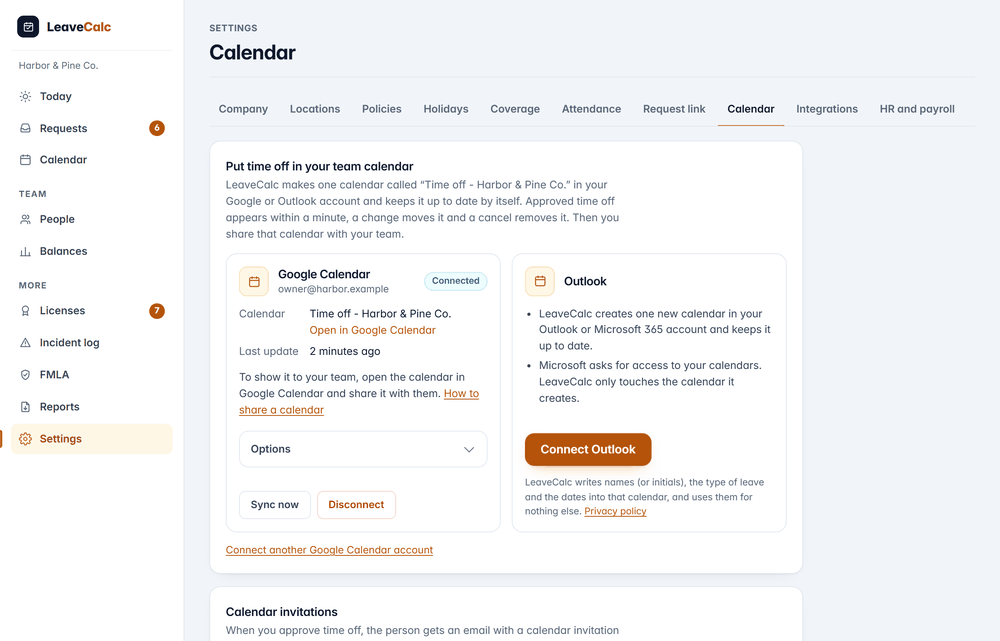
An owner opens Settings, then Calendar, and chooses Connect Google Calendar or Connect Outlook. Sign in, read the permission screen, and allow. The calendar appears in a few seconds.
Calendar: Time off - Harbor & Pine Co.
Share it with your team
LeaveCalc makes the calendar. You decide who sees it: share it in Google Calendar or Outlook, the way you would share any calendar. Your people do not need a LeaveCalc login.
Tip: share it as see all event details so people see the titles.
Leave it alone
Approve, change or cancel a request in LeaveCalc and the event follows, without anyone touching the calendar. Approved time off is one all-day event, and a part day shows its hours in the title.
Approved: Maria Lopez out (Vacation)
What it shows
You choose what each event says
The title follows the privacy setting you pick for the connection, and name and leave type is the default, but sick leave and FMLA leave never name their type whatever you choose, and the title can drop names altogether if you would rather the calendar said only that someone is out.
- Include only some departments or locations.
- Show requests that are still waiting for approval, marked tentative. It is off by default.
- Add company holidays. Also off by default.
What the calendar event says
- Name and leave typeMaria Lopez out (Vacation)
- Sick leave, same choiceMaria Lopez out
- Name onlyMaria Lopez out
- Initials onlyML out
- No namesTime off
- Part of a dayMaria Lopez out (Vacation, 4 h)
- Still waiting for approvalMaria Lopez out (Vacation), pending
Per connection
Every connection has its own options
Connect Google for the office and Outlook for the managers if that is how your company works, and each connection keeps its own title, its own departments and locations, and its own switches for pending requests and company holidays, so one calendar can show names to managers while another shows only Time off to everyone.
Change an option and choose Save and update calendar. LeaveCalc rebuilds the events to match.
- Sync now updates everything straight away.
- Disconnect asks whether LeaveCalc should also delete the calendar it made.

What it does
Small details that keep the calendar true
The calendar is only useful if nobody has to correct it.
Follows every change
An approval adds the event, an edit moves it, a cancellation or a denial removes it, and a renamed or archived person is updated, all without anyone opening the calendar to fix it.
One calendar, nothing else
LeaveCalc creates its own calendar and works only inside it. It does not read or change any other calendar in the account.
Sick and FMLA stay private
No leave type, balance, note or reason is written for sick leave or FMLA, and the title can drop names altogether.
Only the people you pick
Limit a connection to some departments or locations, for a calendar that suits one team.
Retries by itself
If Google or Microsoft is down, LeaveCalc tries again after a minute, then a few minutes, then longer, and if it cannot recover, the card shows Needs attention and you get an email.
More than one account
Connect Google and Outlook side by side, or two accounts of one kind, each with its own title, its own filters and its own switches, so the office calendar and the managers' calendar can differ.
Privacy and security
What Google and Microsoft receive
The calendar lives in your own Google or Microsoft account and under their terms. LeaveCalc writes to it and uses what it learns for nothing else.
Name or initials, type, dates
As far as your privacy setting allows. No balance, note or reason is ever sent, and sick and FMLA leave are never named by type.
Google: one new calendar
The permission is calendar.app.created. LeaveCalc can make secondary calendars and manage events on them, and nothing else in the account.
Microsoft: wide permission, narrow use
Microsoft has no narrower calendar permission, and its screen says full access to your calendars. LeaveCalc makes one calendar and every call goes to that one.
Tokens stay encrypted
The access tokens are stored encrypted on the server in Virginia. They are never shown or logged.
Disconnect cleanly
LeaveCalc deletes its tokens, withdraws its access at Google, and deletes the calendar if you choose. For Microsoft you can also remove it under the apps you have given access to.
Used for nothing else
What comes back from Google and Microsoft is used to keep that calendar current. It is not sold, not used for advertising and not used to train AI models.
Compare your options
A hand-kept calendar or LeaveCalc
A shared calendar that people update themselves is correct for about a week.
| What you need | Calendar kept by hand | LeaveCalc |
|---|---|---|
| Who adds the event | Whoever remembers | LeaveCalc, when the request is approved |
| When a request changes | The old entry stays until someone notices | The event moves or disappears |
| Sick leave | Someone has to remember to hide the reason | Never named by type |
| Who needs a login | Everyone who edits | Nobody. You share the calendar like any other |
| Setup | Create the calendar, then keep it up | Connect once |
What calendar sync does not do
- It is one way. LeaveCalc writes to the calendar and nothing flows back into LeaveCalc, so edit the request, not the event.
- The Microsoft app has no verified publisher yet. Some organizations' administrators block people from agreeing to unverified apps. Then your IT administrator has to approve LeaveCalc before you can connect Outlook, and LeaveCalc cannot lift that block.
- LeaveCalc makes the calendar, and you share it. Google and Microsoft decide who can see it from there.
- Prefer to grant nothing? The subscribe link and the emailed calendar invitation need no setup and no permission.
Pricing
Flat price by team size
One monthly price for the whole team, not a price per person. Prices are in US dollars. The employers page has the full plan details.
Free
$0per month
For teams up to 3 people
Calendar sync included
Pro
$15per month
For teams of 4 to 25 people
Calendar sync included
Business
$69per month
For teams of 26 to 100 people
Calendar sync included
Enterprise
$149per month
For teams of more than 100 people, no seat limit
Calendar sync included
No card for Free or the 14-day trial. Cancel any time, with a 30-day money-back guarantee on paid plans. Paying yearly costs ten months for twelve.
Start freeFAQ
Questions, answered plainly
No. LeaveCalc writes to the calendar and nothing flows back, so if you edit an event in Google Calendar or Outlook, LeaveCalc puts it back the next time it updates, and you should change the request in LeaveCalc instead. Events you add by hand to that calendar are left alone.
Google Calendar, including Google Workspace, and Outlook, including Microsoft 365. You can connect one of each, or more than one account of the same kind, and every connection has its own options.
Usually within a minute, and if Google or Microsoft is slow, LeaveCalc tries again after a minute, then a few minutes, then longer, until the event is there. Sync now on the connection updates everything at once.
Never the type. With the title set to name and leave type, a sick day reads Maria Lopez out, and with names off it reads Time off. No balance, note or reason is ever sent to the calendar.
No. LeaveCalc creates the calendar and you share it with your team in Google Calendar or Outlook, and anyone you share it with can see it there without a LeaveCalc account.
LeaveCalc tells you and offers to make a new calendar. If access is removed in your Google or Microsoft account, the connection shows Needs attention and LeaveCalc emails you, and Reconnect fixes both.
Not through this connection. LeaveCalc also has a read-only subscribe link that works in any calendar app, Apple Calendar included, and an emailed invitation with each approval, and both need no setup and no permission.
Also see
Put time off where your team already looks
Connect a calendar in Settings, then Calendar, and approve one request to watch it appear.