Slack app
Time off Slack app: request and approve in Slack
Type /timeoff to ask for days off. Approvers get a direct message with Approve and Deny buttons. A short list of who is out can land in a channel each morning. The rules are the same as in LeaveCalc, because it is the same engine.
Free for up to 3 people, with a 14-day Pro trial. No card. The Slack app is in every plan.
Time off requests usually start as a chat message. Can I take Friday off? The manager says yes, someone updates a sheet on Monday, and by Wednesday nobody remembers who agreed to what. The slow part was never the decision. It is the step between the yes and the record.
The LeaveCalc Slack app removes that step. The request is made in a form that already knows the balance, the manager answers with a button, and the record is written at the moment of the click, not whenever someone gets around to it.
How it works
Ask, decide and hear back without leaving Slack
Nobody opens another tab to find out what is left.
Ask
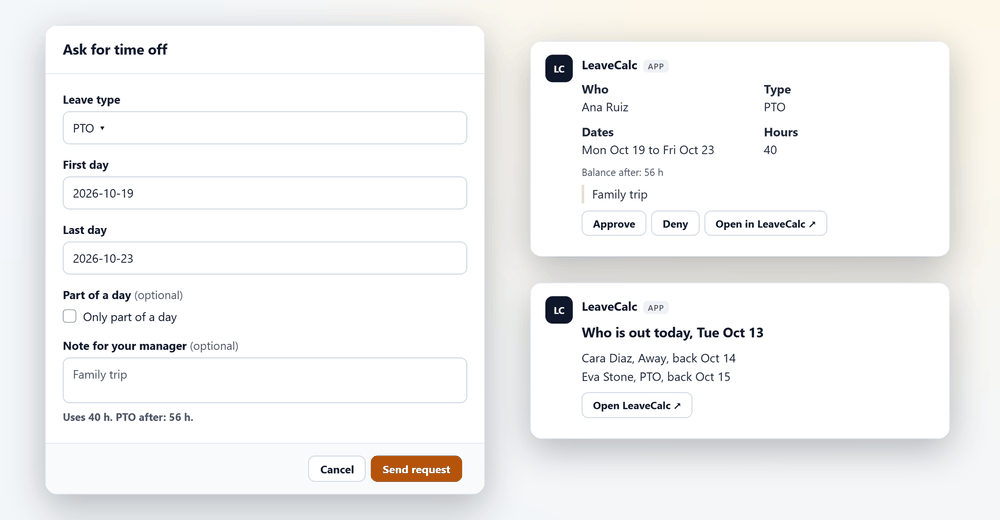
Type /timeoff. A form opens with the leave type, the dates, part of a day and a note. Once you pick dates, a line under the form says what the days use and what is left.
Uses 40 h. PTO after: 56 h.
Decide
The people who decide get a direct message with the request, the balance after and the note, plus Approve, Deny and Open in LeaveCalc. A heads-up line appears when approving would leave a team under its minimum.
Ana Ruiz, PTO, Mon Oct 19 to Fri Oct 23, 40 h.
Hear back
The person who asked gets a direct message when the request is decided, as well as the email. Approved time off goes on the calendar and the balance moves, as if you had clicked in LeaveCalc.
Your time off was approved. See my balance
In Slack
A home tab, and a slash command for the rest
The App Home tab shows your balances, your upcoming time off and, for approvers, the requests waiting for you. The slash command covers the quick questions.
- /timeoff opens the request form.
- /timeoff balance shows what you have left in each leave type.
- /timeoff mine lists your own requests.
- /timeoff out shows who is out today and later this week.
- /timeoff help lists these.

For the owner
The owner decides what goes to Slack
In Settings, Integrations, an owner adds the app, picks a channel for the daily post, and chooses what goes to Slack: requests to the people who decide, approving and denying in Slack, a note to the person once their request is decided, and whether everyone may ask who is out.
- Sick leave and other private leave read Away in the who is out list and in the daily post.
- Nobody can decide their own request in Slack.
- Turn any of it off, remove the link for one person, or disconnect, whenever you like.

What it does
Small features that save a lot of replies
Everything below is a setting an owner can change in one place.
A daily who is out post
Pick a public channel and a time. LeaveCalc posts on workdays, and a button opens LeaveCalc.
Direct messages for approvers
Each approver gets the request, the balance after and the note. They are asked in the same order as by email.
The same rules as the app
Balances, coverage minimums and blackout dates apply to a request made in Slack, exactly as they do in LeaveCalc.
People found by confirmed email
LeaveCalc matches people to Slack members through the address Slack has confirmed. Nobody is found by name.
Signed requests only
Every request from Slack is checked against Slack's signing secret, with a five-minute limit and a replay check.
Owner controls
Turn off approving in Slack, the messages to approvers, the notices or the daily post. Remove one person's link at any time.
Privacy and security
What Slack receives, and what it does not
Slack gets what it needs to show a message to the right person, and nothing more.
Names, dates and balances
Shown to the person meant to see them. An approver's message carries the name, leave type, dates, balance after and the note, if there is one.
Away, not the reason
Sick, FMLA and protected leave read Away in the list and the daily post. Pay and FMLA case details are never sent.
Six permissions
chat:write, commands, im:write, users:read, users:read.email and channels:read. No message history, no files, no private channels.
One workspace per company
Each Slack workspace connects to one LeaveCalc company. A person is found only through an email Slack confirmed, and an owner can remove any link.
The token stays encrypted
LeaveCalc keeps the bot token encrypted, never shows or logs it, and keeps no Slack message history.
A note about Slack admins
A Slack admin can change a member's email address. Someone whose address is set to a manager's could then act as that manager, so keep admin rights with people you trust, or turn off approving in Slack.
Compare your options
Messages and a spreadsheet, or LeaveCalc
A thread works until the sheet falls behind the thread.
| What you need | Messages and a sheet | LeaveCalc |
|---|---|---|
| Asking for time off | A message to your manager, then someone updates the sheet | /timeoff, with the balance in the form |
| Approving | A reply, then a manual edit | A button in a direct message |
| Checking a balance | Ask HR or open the sheet | /timeoff balance |
| Who is out | Scroll the channel or open a calendar | /timeoff out, or the post each morning |
| The record | Whatever the sheet says today | Every decision lands in the same record as the app |
What the Slack app does not do
- It is not in the Slack Marketplace. An owner installs it from LeaveCalc with Add to Slack.
- It does not support Slack Enterprise Grid organization installs yet, and the daily post cannot go to a private channel.
- When your company requires two-step or Google or Microsoft sign-in, approving in Slack stays off unless an owner accepts that, because a Slack button skips that sign-in.
- There is no Microsoft Teams app today.
Pricing
Flat price by team size
One monthly price for the whole team, not a price per person. Prices are in US dollars. The employers page has the full plan details.
Free
$0per month
For teams up to 3 people
The Slack app included
Pro
$15per month
For teams of 4 to 25 people
The Slack app included
Business
$69per month
For teams of 26 to 100 people
The Slack app included
Enterprise
$149per month
For teams of more than 100 people, no seat limit
The Slack app included
No card for Free or the 14-day trial. Cancel any time, with a 30-day money-back guarantee on paid plans. Paying yearly costs ten months for twelve.
Start freeFAQ
Questions, answered plainly
An owner opens Settings, then Integrations, chooses Add to Slack and clicks Allow, and the Slack address of the person who clicks has to match the owner's address in LeaveCalc. Then the card shows the workspace and how many people were found. The app is not in the Slack Marketplace, so you install it from LeaveCalc.
No. LeaveCalc finds each person through the email address that Slack has confirmed for them and matches it to your team list, so nobody needs a LeaveCalc password. Someone whose Slack email is not on the list is told to ask their manager to add it.
The people who would decide it in LeaveCalc, in the same order as by email, each with a direct message that has Approve and Deny. Nobody can decide their own request in Slack, and a blackout period needs an override that you can only give in LeaveCalc.
Sick leave, FMLA and other protected leave read Away in the who is out list and in the daily post, while an approver's own message shows the leave type because they have to decide it. Pay and FMLA case details are never sent.
Yes. Choose a public channel and a time, 08:30 by default, and LeaveCalc posts a short list on workdays once you have invited @LeaveCalc to the channel. Private channels are not supported yet.
LeaveCalc deletes its Slack token, tells Slack to withdraw its access, and stops posting. Your time off records do not change.
Not today. There is a simple webhook that posts to a Teams channel, and the Slack app is the only chat app that is switched on.
Also see
Move the asking and approving into Slack
Add your team, connect Slack in Settings, Integrations, and send a first request.