Time off taken report
PTO utilization report: see who has not taken time off
LeaveCalc lists the people who have gone months without time off, the people sitting on a pile of unused PTO, and how much of this year's leave the team has used. Nobody is flagged on a guess, and sick leave never counts.
Free for up to 3 people, with a 14-day Pro trial. No card. The report is in every plan.
Teams often learn that someone has not taken a day off in a year when that person resigns, or when the balance turns up on the year-end liability report. The signals were there for months. A name that never appears on the calendar. A balance that grows every payday. A manager who says everything is fine, because nobody has asked for anything.
The report puts those signals in one list and does the dull arithmetic for you, so the conversation can happen in March instead of December.
On Today
The first thing a manager sees
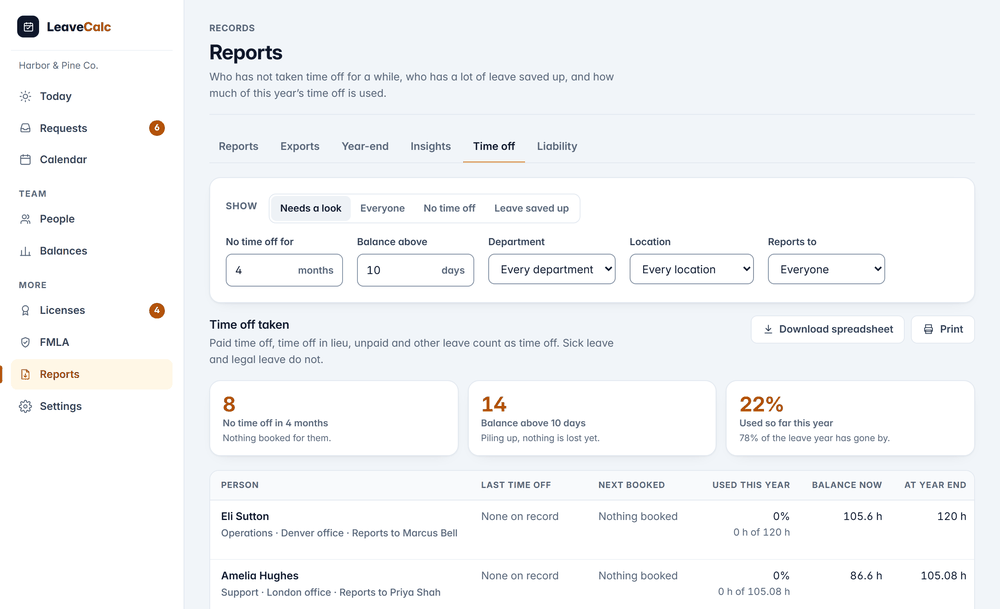
Owners and managers get a card on Today with two plain sentences: 8 people have not taken time off since June, and 14 people have more than 10 days of leave saved up. The first few names sit under each one. One click opens the full report.
The card is on by default. Switch it off in Reports, Time off, if you would rather open the report yourself.
- Show it, hide it, or email it. Each choice is its own switch.
- Someone with time off booked in the next 60 days is listed with the date, and left off the Today count.


Built to be fair
Four rules that keep the list honest
A list that is wrong once stops being read. These rules keep the names on it worth a conversation.
Not flagged on a guess
A person counts as having no time off only if LeaveCalc could have seen their whole window. They started that many months ago, and your company has recorded time off for that long.
Long leave left out
Anyone with an approved request of 14 days or more is not counted. They show as Long leave, not counted, without the leave type.
Sick leave stays out
Sick leave, FMLA, bereavement and jury duty are never a break here, and never named or counted in the report or the emails.
Pace against the calendar
Hours taken so far this year against the whole year's entitlement, next to the share of the year that has gone by. Marked behind at 25 points apart, after the first quarter.
How it works
From report to conversation in three steps
The report ends with a name and a number. What you do next is up to you.
Set what counts
Pick how many months without time off is too long, and how many days of saved up leave is too many. The defaults are 4 months and 10 days. A run can use other numbers without saving them.
No time off for 4 months. Balance above 10 days.
Read the list
Needs a look is the shortlist. Switch to Everyone, No time off or Leave saved up. Narrow it by department, location or the manager people report to.
Last time off, next booked, used this year, balance now, at year end.
Choose who gets told
Nothing is emailed until you say so. Turn on a monthly check-in for owners and managers, and, if you want it, a gentle reminder for employees.
You have 12 days of PTO left this year. Book time off
Reminders
Reminders that stay quiet
The monthly check-in goes to owners and managers on the 1st, and each reader gets only the people they may see. Employees can get a short reminder, but only if you switch it on, and only if they have an email address on file.
It never goes to someone who is out today, to someone on a long leave, or to someone whose sick, FMLA, bereavement or jury leave ended in the last 14 days. It runs Monday to Friday, and no one gets more than one in 90 days.

Privacy
A report about people, handled with care
Time off patterns say something about a person. The report is built to show managers what they need and nothing more.
Sick leave is invisible
Sick leave and legal leave are never named, counted or hinted at in the table, the CSV, the Today card or the emails.
People see their own scope
A manager limited to a department sees only that department. A viewer who joined by company domain sees the list but not the notes on long leave.
No pay, ever
The report holds hours and days. What unused leave is worth lives in the separate liability report.
Compare your options
A spreadsheet or LeaveCalc
A pivot table can answer these questions once a year. It is slow at answering them every month.
| What you need | Spreadsheet | LeaveCalc |
|---|---|---|
| Who has had no time off | A pivot table you rebuild each month | One list, by department, location or manager |
| Leave that will expire | A formula per person and the carry-over rule in your head | Read from each policy, marked Some will expire |
| Sick leave and long leave | You remember to leave them out | Left out by rule |
| Telling people | You write each email | An optional monthly check-in and a gentle employee reminder |
| Spotting it early | At year end, when it is too late | A card on Today, all year |
What the report does not do
- It does not measure burnout, workload or stress. It reads recorded time off and nothing else.
- It only knows the time off recorded in LeaveCalc. A day someone took without telling anyone is not in it.
- Employees cannot switch the reminder off themselves. That is why it is off until you turn it on.
- It does not say what unused leave costs. The leave liability report does.
Pricing
Flat price by team size
One monthly price for the whole team, not a price per person. Prices are in US dollars. The employers page has the full plan details.
Free
$0per month
For teams up to 3 people
The report included
Pro
$15per month
For teams of 4 to 25 people
The report included
Business
$69per month
For teams of 26 to 100 people
The report included
Enterprise
$149per month
For teams of more than 100 people, no seat limit
The report included
No card for Free or the 14-day trial. Cancel any time, with a 30-day money-back guarantee on paid plans. Paying yearly costs ten months for twelve.
Start freeFAQ
Questions, answered plainly
It compares the time off people have taken with the time off they were entitled to over a period. LeaveCalc shows it two ways: the share of this year's entitlement each person has used so far, set next to the share of the leave year that has gone by, and the list of people who have not taken any time off for a set number of months.
No. It shows recorded time off, which is a signal and not a diagnosis, because a person with no time off for six months may be fine and someone who takes every Friday may still be overloaded. The report tells a manager whom to ask. It does not tell them what the answer is.
Paid time off, time off in lieu, unpaid leave and other leave count as time off, while sick leave, FMLA, bereavement and jury duty do not count as a break and are never named or counted in this report. A person is flagged only when LeaveCalc could have seen their whole window, so a new hire, or a company that signed up last week, is not flagged.
Leave saved up means a balance above the number of days you set, 10 by default. If your policy will forfeit part of it on the first day of the next leave year, the report marks it Some will expire, and if nothing is lost it marks it Piling up. The numbers come from the same engine as the Balances page.
Yes. Managers see the same people they see everywhere else in LeaveCalc, and a manager limited to a department sees only that department. You can also filter by department, location or manager, then download the table as a spreadsheet or print it.
Not unless you switch it on. Owners and managers can get a monthly check-in on the 1st, and employees can get a gentle reminder such as You have 12 days of PTO left this year, but that setting is off by default and employees cannot turn it off themselves, so use it deliberately. Nobody gets more than one reminder in 90 days.
No. The report holds no pay data, only hours and days. The leave liability report is separate, and it is where you see what unused leave is worth.
Also see
Know who needs a break before the year ends
Add your team, open Reports, then Time off. The report fills in from the time off you already record.