Doctor's notes on leave requests
Doctor's note tracking for sick leave requests
Set the rule once, for example a note after three days of sick leave. LeaveCalc tags the request that needs one, lets the employee or a manager attach the file, and keeps it encrypted where only the people you allow can open it.
Free for up to 3 people, with a 14-day Pro trial. No card. Documents are in every plan.
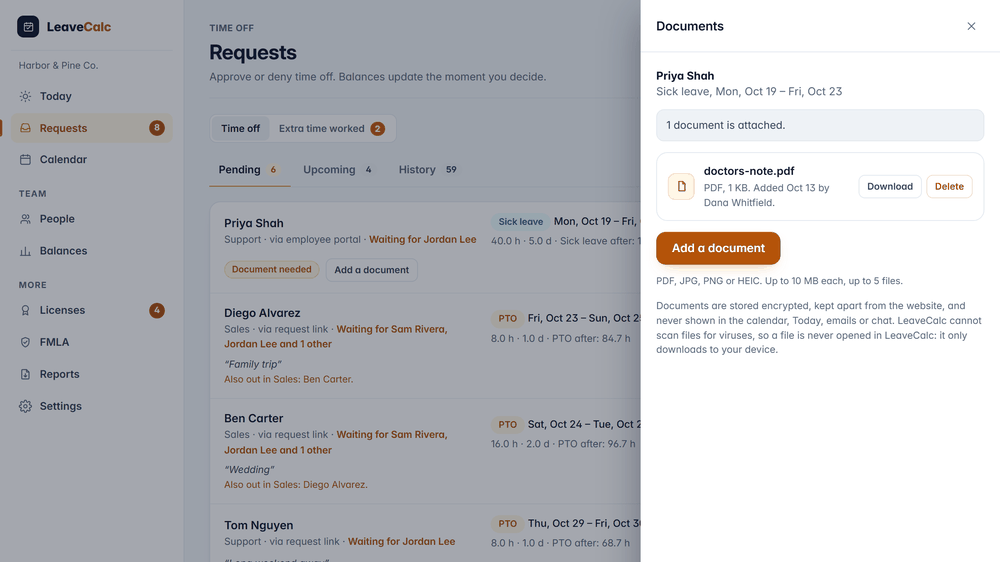
A doctor's note is the one document most small employers ask for, and the one they handle worst. It arrives as an attachment in someone's inbox, gets forwarded to a manager who did not need it, lands in a shared folder that forty people can open, and stays there long after anyone needs it. Nobody chose that on purpose. It happens because the note has no home.
LeaveCalc gives it one: the request it belongs to, with the rule that asked for it, a short list of people who can open it, and a date on which it goes away.
The rule
Set the rule once, for each leave type
Open Settings, then Policies, and edit sick leave. Under Ask for a document you pick one of three things: never, optional, or required once a request is longer than a number of working days. Sick leave often uses three. The count skips holidays and days off.
Want a hard stop? Tick Do not approve until a document is attached. Leave it off and a request that is missing its file only carries a Document needed tag, so an owner can still approve it when chasing a note is not worth it.
- Any leave type can ask for a document, not only sick leave.
- Use 0 working days to ask every time.
- Rules differ by state and city. Some paid sick leave laws limit when you may ask for a note, so check yours before you pick the number.

How it works
From request to approval in three steps
The note travels with the request, so nobody searches an inbox for it later.
A request comes in
The employee asks for sick leave from the request link or their own page. When your rule applies, the people who approve see a Document needed tag next to the request.
Document needed shows beside Priya Shah's five days of sick leave.
The file gets attached
The employee adds the note from their own page, or a manager or an owner attaches it for them. If a request is still missing its file, LeaveCalc sends the employee up to two reminders, the next day and three days later.
1 document is attached. doctors-note.pdf, 1 KB.
You decide
Approve or deny as usual. The tag turns into 1 document attached. The file stays in the request, and every time someone opens it, the activity log records who and when.
Activity log: document opened, by whom, for which request. Never the file name.
Who can see it
Only the people you name can open a file
By default that is the employee and the owners. A manager sees that a document is needed or attached, and nothing more, until you switch on Can open medical documents for that manager. A manager limited to one department never sees documents for sick leave, FMLA, bereavement, jury duty or any leave type you mark protected.
- Viewers cannot open or see any document.
- Opening the list of files, every download and every deletion goes into the activity log with who, when and which request.
- Only people who may open documents can see those log entries.

What it does
A small set of controls
Everything here is switched on per leave type, so a company that never asks for notes sees none of it.
Any leave type
Sick leave, a medical appointment, jury duty or a type you make up. Each policy carries its own rule.
After a set number of days
Ask only when the absence is long enough to matter. Working days are counted, holidays and days off are skipped.
Encrypted before it is saved
Each file is encrypted under its own key and saved under a random name in a folder the web server does not serve.
Two gentle reminders
The employee gets one email the next day and one three days later. It names the leave type and dates and nothing else.
Deleted on schedule
Pick 1, 3 or 7 years, or keep files until someone deletes them. An hourly job removes what has expired.
Taken out when you must
An owner can download the files as one ZIP with a password check. The ZIP can be fetched once within 15 minutes, and the other owners get an email.
Privacy and security
A medical record, kept like one
A doctor's note is health information. LeaveCalc keeps it apart from your other records and says plainly what it protects and what it does not.
Encrypted at rest
AES-128 with an integrity check, and a key made for each file. A file copied into another company's folder, renamed or changed on disk does not open.
Out of sight everywhere else
No document, file name, count or flag appears in the calendar, on Today, in Slack, in webhooks, in the public API or through the AI assistant connection.
Checked, never opened
LeaveCalc reads the file type from its bytes, refuses a PDF with a script, and strips location and camera data from JPG and PNG. A download is always an attachment.
Every access logged
Who listed, downloaded or deleted a file, and when. The log never holds a file name.
Deleted when time is up
Owners set the time. Archiving a person does not delete their files, because the records may still be needed.
Honest limits
No virus scanning. The key lives on the server, so a person with server access could in principle open files. That access belongs to one person and is not used to read customer data.
Compare your options
A shared folder or LeaveCalc
A folder in your inbox or drive works for one or two notes. It gets harder after that.
| What you need | Inbox and shared drive | LeaveCalc |
|---|---|---|
| Where the note lives | An email attachment, a personal drive, a paper folder | One drawer on the request it belongs to |
| Who can open it | Whoever has the folder or the forwarded email | The employee, the owners and the managers you allow |
| Knowing a note is missing | You remember to ask | A Document needed tag and two reminders to the employee |
| How long you keep it | Until somebody cleans up, often never | A time you choose, then deleted automatically |
| Who opened it | Nobody knows | Every opening, download and deletion in the activity log |
What LeaveCalc does not do here
- It does not read, verify or judge a note, and it has no virus scanner. Files are never opened inside LeaveCalc.
- It does not decide when the law lets you ask for a note. You set the rule, and you stay responsible for how you use it.
- It is not a HIPAA covered entity or business associate. The privacy policy explains what that means for you.
- Deleted files stay in the nightly backup copies until they are replaced, within 14 days.
Pricing
Flat price by team size
One monthly price for the whole team, not a price per person. Prices are in US dollars. The employers page has the full plan details.
Free
$0per month
For teams up to 3 people
Documents included
Pro
$15per month
For teams of 4 to 25 people
Documents included
Business
$69per month
For teams of 26 to 100 people
Documents included
Enterprise
$149per month
For teams of more than 100 people, no seat limit
Documents included
Document storage is 50 MB for a company on the Free plan and 1 GB on a paid plan. One person can hold up to 200 MB.
No card for Free or the 14-day trial. Cancel any time, with a 30-day money-back guarantee on paid plans. Paying yearly costs ten months for twelve.
Start freeFAQ
Questions, answered plainly
Many policies ask after a set number of days, often three, or after a pattern of short absences, and some state and city sick leave laws limit when you may ask at all, so LeaveCalc applies the rule you choose and leaves the law to you. Check your state labor department or a lawyer before you set the number.
Yes, from their own page after an emailed sign-in link, and a manager or an owner can attach a file for them. A person with no email address on file can add one from the request link right after they send the request, and that file waits for an owner to accept it before anyone can download it.
The employee and the owners, plus any manager you switch on with Can open medical documents, which is off by default. A manager limited to one department never opens documents for sick leave, FMLA, bereavement, jury duty or a leave type you marked protected. Viewers cannot open any.
No. It checks that the file is a PDF, JPG, PNG or HEIC picture and refuses anything else, but it does not read the words, does not judge whether a note is genuine, and does not scan for viruses. Your approver reads the note in their own PDF reader or photo viewer.
PDF, JPG, PNG and HEIC, up to 10 MB each and up to 5 files on a request. A company on the Free plan can store 50 MB of documents, a paid plan 1 GB, and one person up to 200 MB.
You choose 1 year, 3 years, 7 years or until someone deletes them, counted from the last day of the request, and three years is the default because it matches the record-keeping time for FMLA documents in the United States (29 CFR 825.500). Choosing 1 year shows a warning. A job deletes expired files every hour, and a deleted file stays in the nightly backup copies until they are replaced, which is within 14 days.
Never. No document, file name, count or flag appears in the calendar, on Today, in the weekly summary, in the Slack app, in webhooks, in the public API or in the AI assistant connection, and the only email is a reminder to the person who has not attached a file yet, which names the leave type and the dates and says nothing about the reason.
LeaveCalc is not a HIPAA covered entity or business associate. The design follows what the FMLA and the ADA ask of an employer that holds medical information, which is to keep it confidential, apart from the general personnel file, and share it only with people who need it. You decide what to ask for and how you use it, so ask your own counsel about your duties.
Also see
Keep the note with the request
Set the rule for sick leave, try it with one request, and read the security overview if your IT team asks.