OSHA incident log
OSHA 300 log software for injury and illness records
Enter each work-related injury or illness once. LeaveCalc keeps the OSHA 300 log for each location, adds up the 300A summary, prints the 301 report and writes the files for OSHA's Injury Tracking Application. Only the people you choose can open any of it.
Free for up to 3 people, with a 14-day Pro trial. No card. The incident log is in every plan. The recordability check is guidance, not legal advice.
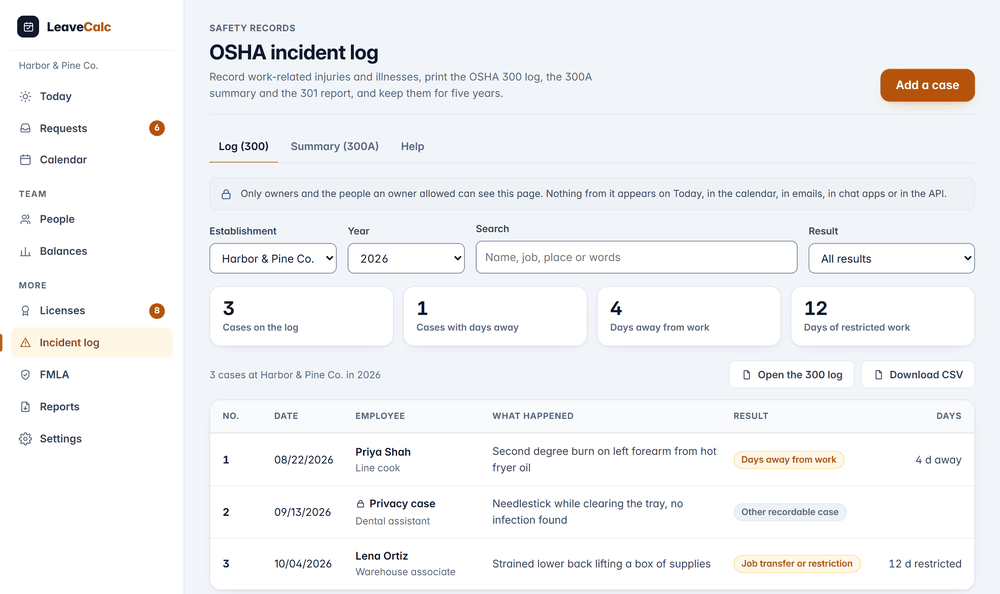
An injury log is two things at once. It is a form you owe under OSHA's rules, and it is a medical record about someone who works for you. Most small employers keep it in a spreadsheet on a shared drive. That gets the first part half right and the second part wrong.
LeaveCalc keeps one log for each location and year, prints a privacy case as Privacy case, and keeps the whole thing off every screen, email and export that a person who should not see it could reach.
Is it recordable?
A short check before you add a case
A new case starts with questions that follow 29 CFR 1904.5 to 1904.11. Was it work-related? Does an exception apply? Is it a new case? Did it lead to a death, days away, restricted work or a job transfer, medical treatment beyond first aid, or one of the significant diagnoses?
It also asks whether anyone was admitted to hospital as an in-patient or lost a limb or an eye. OSHA wants a call about those whether or not the case is recordable, within 8 hours for a death and 24 hours for the rest.
- The check is guidance, and the screen says so. The decision is yours.
- A case later found not recordable is removed from the log, not deleted. It is kept, not counted and not printed.

How it works
From an injury to the forms in three steps
LeaveCalc can estimate the employees and hours from your team, so you start from a number and check it against payroll.
Record the case
Add the person, the date, where it happened and what happened. Choose the most serious result and the type of injury or illness. Enter it, with the 301 details, within 7 calendar days after you learn about it.
Case 3, 2026. Job transfer or restriction, 12 days.
Keep the log
The log lists each case with its result and days. Switch the location or the year. A privacy concern case shows as Privacy case with a lock, and its name goes on a separate confidential list.
Privacy case. Needlestick while clearing the tray.
Close the year
After the year ends, check the totals on the 300A, enter the average number of employees and the hours worked, and have a company executive certify it. Post it from February 1 to April 30 and keep it for five years.
Post by Feb 1. Leave it up until Apr 30.
The forms
Print the 300, the 300A and the 301
Open the 300 log, the 300A summary or any 301 report and print it. The pages are copies of OSHA's forms made from your records, with the official labels and the same columns. OSHA allows an equivalent form when it holds the same information (29 CFR 1904.29(b)(4)), and its own PDFs stay the originals.


- A 301 can print in full, or in a shorter version for an employee representative, with no name, hire date or doctor.
- Download the log and the privacy case list as CSV files.
Sending it to OSHA
Files for OSHA's Injury Tracking Application
Some establishments must send their records to OSHA's Injury Tracking Application by March 2. Which ones depends on the size of the establishment and its industry, and OSHA's coverage tool tells you. LeaveCalc writes the CSV files in the format OSHA publishes: one for the 300A summary, one for the 300 and 301 case data. Neither has a name, an address or a doctor in it.
A check lists what the file still lacks, such as the NAICS code, the EIN or the hours worked, before you upload at osha.gov/injuryreporting.
- You upload the files yourself. LeaveCalc does not connect to OSHA or file anything for you.
- Record the date you sent it on the summary.

Privacy and security
An injury record, kept like a medical record
A case says what happened to a named person's body. LeaveCalc keeps it apart from the rest of the product and says plainly what it protects.
Owners and the people you name
Only owners and users given Can see incident records can open the log. That permission goes to a manager without a department limit, or to a viewer. A manager limited to a department never has it.
Nowhere else
Nothing from a case shows on Today, in the calendar, in emails, in the digest, in chat apps, in webhooks, in the public API or through the AI connection. The one exception is the posting reminder for the 300A, which has no case in it.
Privacy cases as the rule says
A privacy concern case prints as Privacy case. Only the reasons on the closed list in 29 CFR 1904.29(b)(7) qualify, and the list that joins case numbers to names is its own page.
Every look is logged
Opening a case, a list, a form or an export writes a line to the activity log with the action and the case number. Never a value.
Kept five years, then yours to delete
A case cannot be deleted before five years after the end of the year it covers. After that only an owner can, with the password or a fresh sign-in.
Attachments stay encrypted
Photos and reports attached to a case, up to 10 for each, go into the same encrypted store as other documents and are only ever downloaded.
Compare your options
A spreadsheet or LeaveCalc
A spreadsheet can hold the 300 log. It is less good at the privacy rules, the totals and the file OSHA asks for.
| What you need | Spreadsheet | LeaveCalc |
|---|---|---|
| One log for each site | Tabs you copy every January | A log for each location and year |
| Privacy cases | Hide the name by hand and hope no other tab is shared | Prints Privacy case, with a separate confidential list |
| The 300A totals | Formulas you check yourself | Added up from the log, with an estimate of employees and hours |
| Who can open it | Anyone with the file | Owners and the people you name |
| The upload file for OSHA | Retype it into OSHA's template | CSV in OSHA's format, with a check for what is missing |
| Five years of records | A folder you hope survives | Cases cannot be deleted for five years |
What the log does not do
- It is record keeping help and guidance, not legal advice. The questions follow 29 CFR 1904, and the decision on each case is yours.
- It does not tell you whether you must keep these records. Employers with 10 or fewer employees all year, and employers in some low-hazard industries, are partly exempt. OSHA publishes the list.
- It does not report to OSHA for you. You upload the CSV files yourself, and you phone in a death or a hospitalization yourself.
- The printed pages are copies made from your records. OSHA's own PDFs are the originals.
Pricing
Flat price by team size
One monthly price for the whole team, not a price per person. Prices are in US dollars. The employers page has the full plan details.
Free
$0per month
For teams up to 3 people
The incident log included
Pro
$15per month
For teams of 4 to 25 people
The incident log included
Business
$69per month
For teams of 26 to 100 people
The incident log included
Enterprise
$149per month
For teams of more than 100 people, no seat limit
The incident log included
No card for Free or the 14-day trial. Cancel any time, with a 30-day money-back guarantee on paid plans. Paying yearly costs ten months for twelve.
Start freeFAQ
Questions, answered plainly
Most employers with more than 10 employees at any time in the last calendar year, except those in some low-hazard industries. Employers with 10 or fewer employees all year, and employers in the exempt industries, are partly exempt. OSHA can also ask any employer in writing to keep the records. Check OSHA's list for your industry code, and your state, since states that run their own OSHA program can ask for more.
The 300 is the log: one line for each recordable case at one establishment in one year. The 300A is the yearly summary of that log, certified by a company executive and posted from February 1 to April 30. The 301 is the incident report, one for each case, with the full story. LeaveCalc prints all three and keeps them together.
Enter the case on the 300 and fill in the 301 within 7 calendar days after you learn about it (29 CFR 1904.29(b)(3)). LeaveCalc shows that date on the case page.
A case in a short list of kinds that OSHA allows you to keep anonymous on the log: an injury to an intimate body part, a sexual assault, a mental illness, HIV, hepatitis or tuberculosis, a needlestick, or another illness where the employee asks for the name to be left off. The log shows Privacy case instead of the name, and you keep a separate confidential list of case numbers and names (29 CFR 1904.29(b)(6) to (9)).
Some establishments do, by March 2 each year, through OSHA's Injury Tracking Application. Which ones depends on the size of the establishment and its industry, and OSHA has a coverage tool that tells you. LeaveCalc writes the CSV files in OSHA's published format, with no names, addresses or doctors in them, and you upload them yourself.
Five years following the end of the calendar year they cover (29 CFR 1904.33). That covers the log, the privacy case list, the 300A and the 301 reports. LeaveCalc does not let you delete a case before that time, and after it only an owner can, with the password or a fresh sign-in.
Owners, and users an owner gave Can see incident records. A manager with no department limit or a viewer can have that permission. A manager limited to a department never can, because a log with holes in it is not a log. Nothing from a case appears on Today, in the calendar, in emails, in chat apps, in the public API or through the AI connection.
It asks the questions of 29 CFR 1904.5 to 1904.11 and shows what your answers point to. That is guidance, not legal advice, and the decision is yours. Ask OSHA or a safety professional when a case is unclear. Separately, it reminds you that a work-related death must be reported to OSHA within 8 hours, and an in-patient hospitalization, an amputation or the loss of an eye within 24 hours (29 CFR 1904.39).
Also see
Keep the log, the summary and the report in one private place
Add the first case, check the 300A totals, and print the forms when you need them.