Personnel files
Personnel file software for contracts, ID and signed policies
Give each person one private file, with folders for contracts, identity papers, tax forms and signed policies. Form I-9 sits in a folder of its own that only owners can open. Set how long each folder is kept, and LeaveCalc deletes what has run out.
Free for up to 3 people, with a 14-day Pro trial. No card. Personnel files are in every plan.
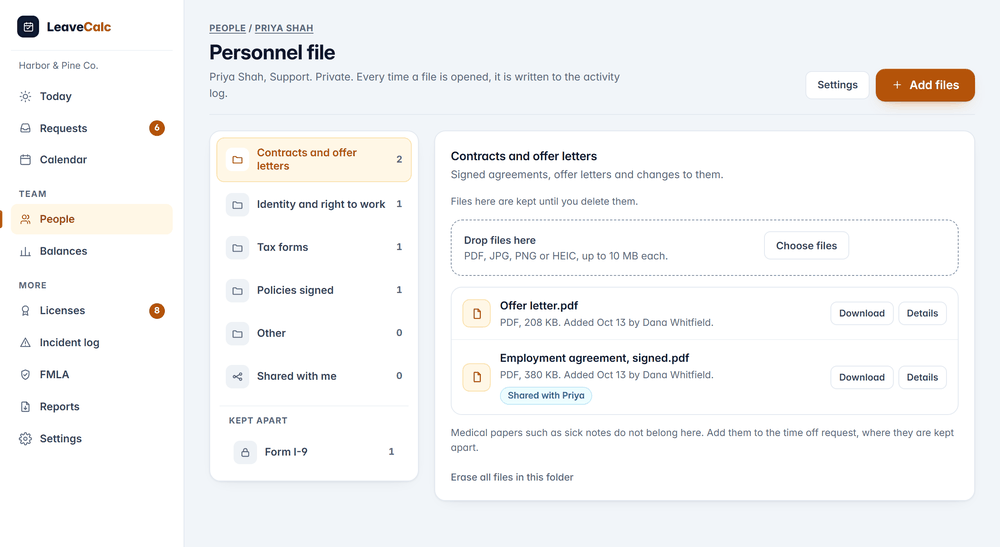
Personnel files go wrong in a familiar way. The signed offer letter is in someone's inbox, the ID scan is on a phone, the policy acknowledgments are in a binder, and Form I-9 sits in the same folder as everything else, where an auditor and a curious colleague can both read it.
Employment records do not need a big system. They need one place for each person, a short list of people who can open it, and a date on which each kind of paper goes away.
How it works
From a pile of papers to one file in three steps
Each file needs a person, a folder and, if it runs out, a date.
Open the file
From the People screen, open Personnel files, or open it from the person's own page. Each person has folders for contracts, identity papers, tax forms, signed policies and anything else.
Contracts and offer letters hold 2 files.
Add files, with dates
Drop in PDF, JPG, PNG or HEIC files of up to 10 MB each, and up to 200 files for each person. Give a work permit an expiry date, add a note, and choose whether the person sees the file on their own page.
Shared with Priya. The signed employment agreement.
Let the dates chase themselves
LeaveCalc emails the owners 60 days and 14 days before an expiry date and the day after it passes. Nobody has to remember the work permit.
Expires Nov 16, in 34 days. Identity and right to work.
Form I-9
Form I-9 gets a folder of its own
USCIS recommends that employers keep Form I-9 separate from personnel records, to make an inspection request easier. So Form I-9 has its own folder, under Kept apart. Only owners can open it. No manager permission reaches it, the employee never sees it, and it is never shared.
The keep time follows the US rule: three years after the date of hire or one year after employment ends, whichever is later. While a person works for you nothing is deleted. After they leave, LeaveCalc keeps each form until that date and then deletes it, unless you switch automatic deletion off. Deleting a form earlier asks an owner to confirm.
- Every use of Form I-9 is logged under its own actions, and only owners see those rows.
- It is a record-keeping aid. It does not tell anyone their I-9 duties, and the screen says it is not legal advice.

Access
Only the people you allow can open a file
Owners can always open personnel files. A manager can only after an owner switches on Can see personnel files for that manager, which is off by default. A manager limited to a department sees only that department, and viewers never see files. A manager can delete a file they added by mistake. Every other deletion is for owners.
- The employee sees only what an owner shared, never a note, and can add to Shared with me only when you allow it.
- Every list of names, download, upload, change and deletion goes to the activity log, never with a file name or a note.

Retention
Set a keep time for each folder
For each folder, choose Keep until I delete them, or 1, 2, 3, 4, 5, 7 or 10 years after the person's last day. People who still work for you keep everything. An hourly job deletes files that are past their time and writes one line to the log with how many.
Shorten a keep time and LeaveCalc asks first, because the older files go for good at the next run. The numbers are yours to pick. LeaveCalc does not know your state's rules on how long to keep employment records.
- Erase one person's files, or one folder, with the owner's password or a sign-in from the last 10 minutes.
- Download everything as a ZIP, for owners only, with the same check. The other owners get an email.

Expiry dates
Dates that chase themselves
A file can carry an expiry date, such as a work permit. 60 days before, 14 days before and the day after it passes, one grouped email goes to the owners and to the managers who may open that person's file. It names the person and the date, never the file.
The Personnel files screen lists the dates coming up in the next 60 days and the ones that have passed, and you can download the whole list as a spreadsheet.

What it does
Small details that keep a file private
A personnel file holds the most sensitive papers in the company. These rules are why it is safe to keep them here.
Encrypted file by file
AES-128 with an integrity check and a key made for each file. A file copied into another company's folder, renamed or changed on disk does not open.
Checked, never opened
LeaveCalc reads the file type from the bytes, refuses a PDF with a script or an embedded file, and strips camera position and notes from pictures. A download is always an attachment.
Out of every other screen
No file, file name, count or flag appears on Today, in the calendar, in emails, in chat apps, in the public API, through the AI connection or in the company export.
Every access logged
Who listed, opened, added, changed or deleted a file, and when. The log never holds a file name or a note.
A list and a ZIP when you need them
Download the list of files as a spreadsheet, or all the files as a ZIP. The ZIP is for owners, behind a password check.
Employees can add too
Switch on Let employees add files and people can drop a signed form into Shared with me from their own page, and delete what they added.
Compare your options
A shared drive or LeaveCalc
A folder per person on a shared drive works until someone shares the wrong link.
| What you need | Shared drive | LeaveCalc |
|---|---|---|
| Where the papers live | Email, a phone, a binder and a drive | One file for each person, in folders |
| Who can open them | Whoever has the link | Owners, and the managers you allow, for their own departments |
| Form I-9 | In the same folder as the rest | A folder of its own, owners only, with its own keep date |
| Expiring papers | Somebody remembers the work permit | Emails 60 and 14 days ahead |
| Clearing out old files | Never | Deleted on the date you set for each folder |
| Who opened what | Nobody knows | Every open and download in the activity log |
What personnel files do not do
- It stores papers. It does not write them. There are no e-signatures, offer letter templates or forms to fill in.
- It does not read or verify a file, and it has no virus scanner. Files are only ever downloaded.
- Keep times are yours to choose. LeaveCalc does not know your state's rules on how long to keep employment records.
- The Form I-9 folder keeps the paper and the date. It does not complete or verify the form, and it is not legal advice.
- Deleted files stay in the nightly backup copies until they are replaced, within 14 days. Medical papers such as sick notes are not kept here.
Pricing
Flat price by team size
One monthly price for the whole team, not a price per person. Prices are in US dollars. The employers page has the full plan details.
Free
$0per month
For teams up to 3 people
Personnel files included
Pro
$15per month
For teams of 4 to 25 people
Personnel files included
Business
$69per month
For teams of 26 to 100 people
Personnel files included
Enterprise
$149per month
For teams of more than 100 people, no seat limit
Personnel files included
Files share the document space of the company, 50 MB on the Free plan and 1 GB on a paid plan.
No card for Free or the 14-day trial. Cancel any time, with a 30-day money-back guarantee on paid plans. Paying yearly costs ten months for twelve.
Start freeFAQ
Questions, answered plainly
The papers about the job: the signed offer letter and contract, proof of identity and right to work, tax forms, signed policies and any changes to the terms. LeaveCalc has a folder for each, plus Other and Shared with me. Medical papers, such as a sick note, stay with the time off request under stricter rules, and Form I-9 has a folder of its own.
USCIS recommends that employers keep Form I-9 separate from personnel records, so that an inspection request does not expose everything else. LeaveCalc gives Form I-9 its own folder under Kept apart. Only owners can open it, no manager permission reaches it, the employee never sees it, and it is never shared.
Three years after the date of hire or one year after employment ends, whichever is later (USCIS Handbook for Employers M-274, section 10, and 8 CFR 274a.2(b)(2)(i)(A)). LeaveCalc keeps the date for each form and, unless you switch it off, deletes the form on that date after the person has left. This is a record-keeping aid and not legal advice.
It depends on the paper, your state and sometimes your industry, so LeaveCalc does not choose for you. For each folder, pick Keep until I delete them, or 1, 2, 3, 4, 5, 7 or 10 years after the person's last day. People who still work for you keep everything. Ask your lawyer or accountant for the numbers.
Owners. A manager only after an owner switches on Can see personnel files for that manager, which is off by default, and a manager limited to a department sees only that department. Viewers never do. No manager reaches Form I-9. A manager can delete a file they added by mistake, and every other deletion is for owners.
They see the files an owner shared with them, on their own page, and never the notes or Form I-9. If you allow it, they can also add files to the Shared with me folder, for example a signed form, and delete what they added. Some states give employees a right to see their personnel file, so check yours.
Yes. Each file is encrypted before it is saved, under a key of its own, and stored under a random name in a folder the web server does not serve. A file copied into another company's folder, renamed or changed on disk does not open. The key lives on the server, so someone with access to the server could in principle open files.
Nothing, at first. Archiving a person does not delete their files. The keep time of each folder counts from their last day, or from the day they were archived when no last day was recorded. The people who left stay in the list under Show people who left, and their files stay until the time you chose is up.
Also see
Give every person one private file
Open a person, drop in the contract, and set how long the folder is kept.