Single sign-on
SAML single sign-on for leave management
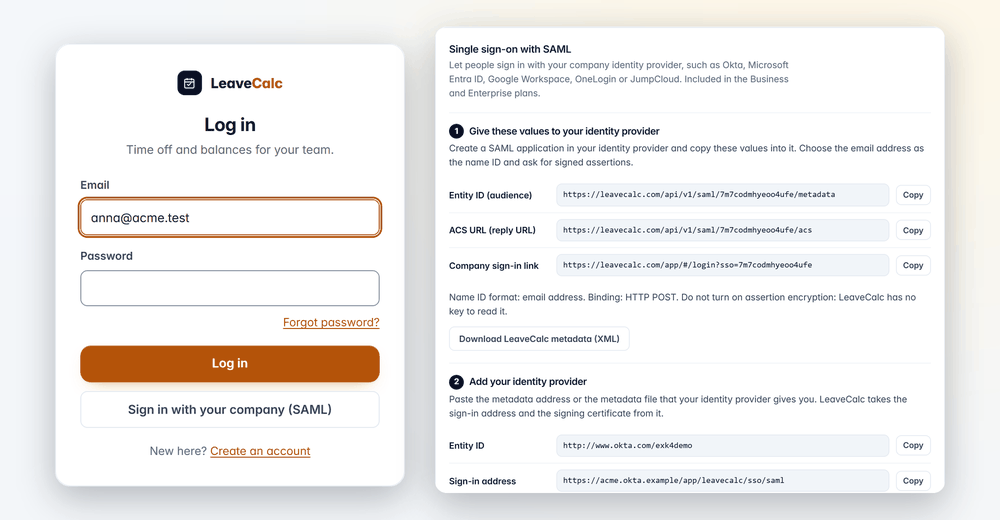
People type their work email, choose Sign in with your company, sign in at Okta, Microsoft Entra ID, Google Workspace or another SAML 2.0 provider, and land in LeaveCalc. It comes with the Business and Enterprise plans.
Included in Business and Enterprise. The 14-day free trial includes it, so you can set it up and test it first. No card.
Where this stands. We tested LeaveCalc with generated test keys and test responses. We have not yet tried it against a live Okta, Entra ID or Google Workspace tenant, and no identity provider vendor has certified or listed it. The checks described below are real and run on every sign-in.
Single sign-on matters most on the day someone leaves. With separate passwords, a former employee's account stays alive in every tool until somebody remembers to remove it, and leave data is personal data. With SAML, your identity provider decides who can start a sign-in, and your IT team already runs that process.
LeaveCalc adds the checks that make the handoff safe: a proved domain, a signed response, and a session that ends after 12 hours at most.
How it works
Set up in three steps
The card in Settings numbers the steps for you, and every value has a Copy button.
Give LeaveCalc's values to your provider
In Settings, then Account, copy the Entity ID, the ACS URL and the company sign-in link into a new SAML application. Use the email address as the name ID, ask for signed assertions, and leave encryption off.
Entity ID, ACS URL, company sign-in link. Download the metadata file if you prefer.
Paste your provider's metadata
Add the metadata address or the metadata file your provider gives you. LeaveCalc takes the sign-in address and the signing certificate from it, and you can read the address again after a certificate renewal.
Sign-in address and certificate: valid until a date you can see.
Prove the domain, test, switch on
Add the DNS TXT record for each email domain and press Check now. Run Test sign-in with your own work email. When it works, turn SAML on, and later, if you want, Require SAML for everyone.
Test sign-in first. Require SAML after one success.
Safe by default
Prove the domain, then turn it on
Only people with an email address at a domain you have proved can sign in. LeaveCalc looks the record up again once a day, and a domain loses its proof only after two answers that the record is missing, at least 24 hours apart. The owners get an email when that happens.
- By default only people who already have a LeaveCalc account at your company can sign in.
- Switch on a viewer account for new people from one domain if you want one.
- LeaveCalc never merges people by address, and it refuses an address that belongs to another LeaveCalc company.

What it does
What your IT team will ask about
Straight answers to the questions on a security questionnaire.
Any SAML 2.0 provider
Built for Okta, Microsoft Entra ID and Google Workspace, and for others such as OneLogin and JumpCloud.
Sign-in starts at LeaveCalc
LeaveCalc refuses a sign-in that starts from an app tile at the provider, because it has no request to compare with. Your company gets a link to bookmark instead.
Signed responses only
RSA or ECDSA with SHA-256 or stronger. LeaveCalc refuses SHA-1, and it checks the signature against the certificates you saved, never one sent inside the message.
Matched by email, inside one company
The address becomes the sign-in email of a person at your company. LeaveCalc refuses an address that already belongs elsewhere, and never merges it.
Sessions that end
A SAML session lasts 12 hours at most. Your provider's own checks, multi-factor included, apply instead of LeaveCalc's two-step prompt.
Everything in the log
Every change, every sign-in and every failed sign-in is written to the activity log.
Privacy and security
What LeaveCalc checks on every sign-in
A SAML response is only as safe as the checks behind it. These run each time, and they are the same for every company.
Your certificate, not theirs
LeaveCalc checks the response only against the certificates you saved.
Every field checked
Audience, destination, the request it answers and the time limits, with 3 minutes of clock difference allowed. Each assertion works once.
XML tricks refused
LeaveCalc refuses a message that contains a DTD or an entity before it reads anything.
Changes need proof
Changing the provider or the switches asks the owner for the password or a recent sign-in, and an email goes to every owner.
Logged without secrets
The response, the assertions and the certificates are never written to a log.
A way back in
With Require SAML on, owners keep an emailed one-time code, so a wrong setting cannot lock the company out for good.
Compare your options
Separate passwords or single sign-on
Another password for another tool is one more thing to lose track of.
| What you need | Separate passwords | LeaveCalc |
|---|---|---|
| Who can sign in | Anyone with a password somebody created | People at a domain you proved, through your provider |
| Strength of the sign-in | Whatever each person picks | Your provider's rules and multi-factor |
| Turning someone off | Remember each tool | Disable the account. A new sign-in stops, and an open session ends within 12 hours |
| A record of sign-ins | The tool's own log, if it has one | Sign-ins and failed sign-ins in the LeaveCalc activity log |
| Forcing everyone | Not possible | Require SAML for everyone, with an owner code as the way back |
What SAML does not do here
- We tested it with generated test keys and test responses, not yet with a live Okta, Entra ID or Google Workspace tenant.
- There is no SCIM. People are not added to or removed from LeaveCalc automatically by your identity provider.
- Encrypted assertions, signed requests and single logout are not supported. A session ended at the provider stays open in LeaveCalc until its 12 hours are over.
- Require SAML does not cover the employee page and request link, API tokens, the AI assistant connection, outgoing webhooks, the Slack app, or the owners' emailed one-time code.
Pricing
Flat price by team size
One monthly price for the whole team, not a price per person. Prices are in US dollars. The employers page has the full plan details.
Free
$0per month
For teams up to 3 people
SAML single sign-on not included
Pro
$15per month
For teams of 4 to 25 people
SAML single sign-on not included
Business
$69per month
For teams of 26 to 100 people
SAML single sign-on included
Enterprise
$149per month
For teams of more than 100 people, no seat limit
SAML single sign-on included
SAML is part of Business and Enterprise. A company on its free trial can set it up and try it. Every other feature is in every plan.
No card for Free or the 14-day trial. Cancel any time, with a 30-day money-back guarantee on paid plans. Paying yearly costs ten months for twelve.
Start freeFAQ
Questions, answered plainly
It is meant for Okta, Microsoft Entra ID, Google Workspace and any other provider that supports SAML 2.0, such as OneLogin or JumpCloud. The SAML setup guide has the steps for an IT administrator.
Not yet. We tested LeaveCalc with generated test keys and test responses, and the checks on every sign-in run against those, but no identity provider vendor has certified or listed it. If you want to try it against your own tenant, the free trial includes SAML, and the Test sign-in button shows you the result before you switch anything on for your people.
Business and Enterprise, and a company on its free trial can set it up and try it. Free and Pro do not include it. If a plan or trial ends while Require SAML is on, the requirement and SAML sign-in stay on for 30 more days, and the owners get an email at the start and at the end.
No. There is no SCIM. By default only people who already have a LeaveCalc account at your company can sign in, and you can switch on a viewer account for new people from a domain you have proved, which can see people, requests and the calendar but not FMLA cases, licenses or notes on a person.
A new SAML sign-in stops once you disable the account at your identity provider. A session that is already open stays open in LeaveCalc until its 12 hours are over, so deactivate the person in LeaveCalc as well.
Yes, after one successful test sign-in by you. Require SAML for everyone then stops passwords and Google or Microsoft sign-in for your company and ends the sessions that SAML did not make, and owners keep a one-time code sent to their email, so a wrong setting cannot lock the company out for good.
No. The identity provider's own checks apply to them, including multi-factor, and a SAML session lasts 12 hours at most.
Four values from the SAML card in Settings, Account: the Entity ID (audience), the ACS URL (reply URL), the name ID format (email address) and HTTP POST binding. They also choose signed assertions and leave assertion encryption off. LeaveCalc offers a metadata file to download, and takes your provider's metadata address or file in return.
Also see
Try single sign-on before you commit
Start the free trial, open Settings, Account, and run a test sign-in with your own work email.